Guides
Claude for Amazon Sellers: Connect It, Install the Skills, Run the First Checks
How to connect Claude to Seller Central and Amazon Ads, what Claude skills for sellers are, the 39 that ship with the setup, and the five checks to run first.
 Dhiraj SoniFounder, OwnYourAMZ. Ex-Amazon.
- Published
- Updated
- Reading time
- 12 min read
Claude for Amazon sellers comes down to three things: a connection so it can see your account, skills so it knows what to look for, and a habit of asking it the right five questions. Amazon now has two official ways in, a Selling Partner plugin for Claude and an Ads MCP server, and a dozen third parties sell connectors. This guide covers how each connection works, what a Claude skill for Amazon actually is, the 39 that ship with our setup, and the first checks to run once Claude can read your numbers.
Disclosure: we make OwnYourAMZ, one of the connection routes below. The others are described from their own documentation as of 27 October 2026.
Key Takeaways
- Claude cannot see Seller Central by default. It needs a connector. Amazon's own Selling Partner plugin (beta since 23 September 2026) covers sales, inventory and listings for US stores, with no advertising data. Amazon's Ads MCP server covers ads only and needs your own API credentials.
- Four routes exist: Amazon's plugin and server, hosted connectors ($39 to $359 a month), open source servers you host, and an owned deployment in your own account (about $5 a month). Only the last two keep your data with you.
- A skill is a playbook, not a prompt. It is a folder with a SKILL.md file that tells Claude what to look at, what counts as a problem and what to do. Skills without data access produce generic advice; skills with data access produce decisions.
- 39 skills ship with the setup, from a wasted spend hunt and a bid and budget review to a reimbursement claims finder and a support case writer. One of them writes new skills from a sentence.
- Start read-only, then approve writes. Every change Claude proposes should arrive as a plan with counts, run only on your yes, and be logged with the value before and after.
What Claude Does for a Seller Once It Can See the Account
Without a connection, Claude is a very good reader of whatever you paste. With one, it becomes the person who checks every account before you wake up. The jobs it takes over first, in the order most sellers hand them over:
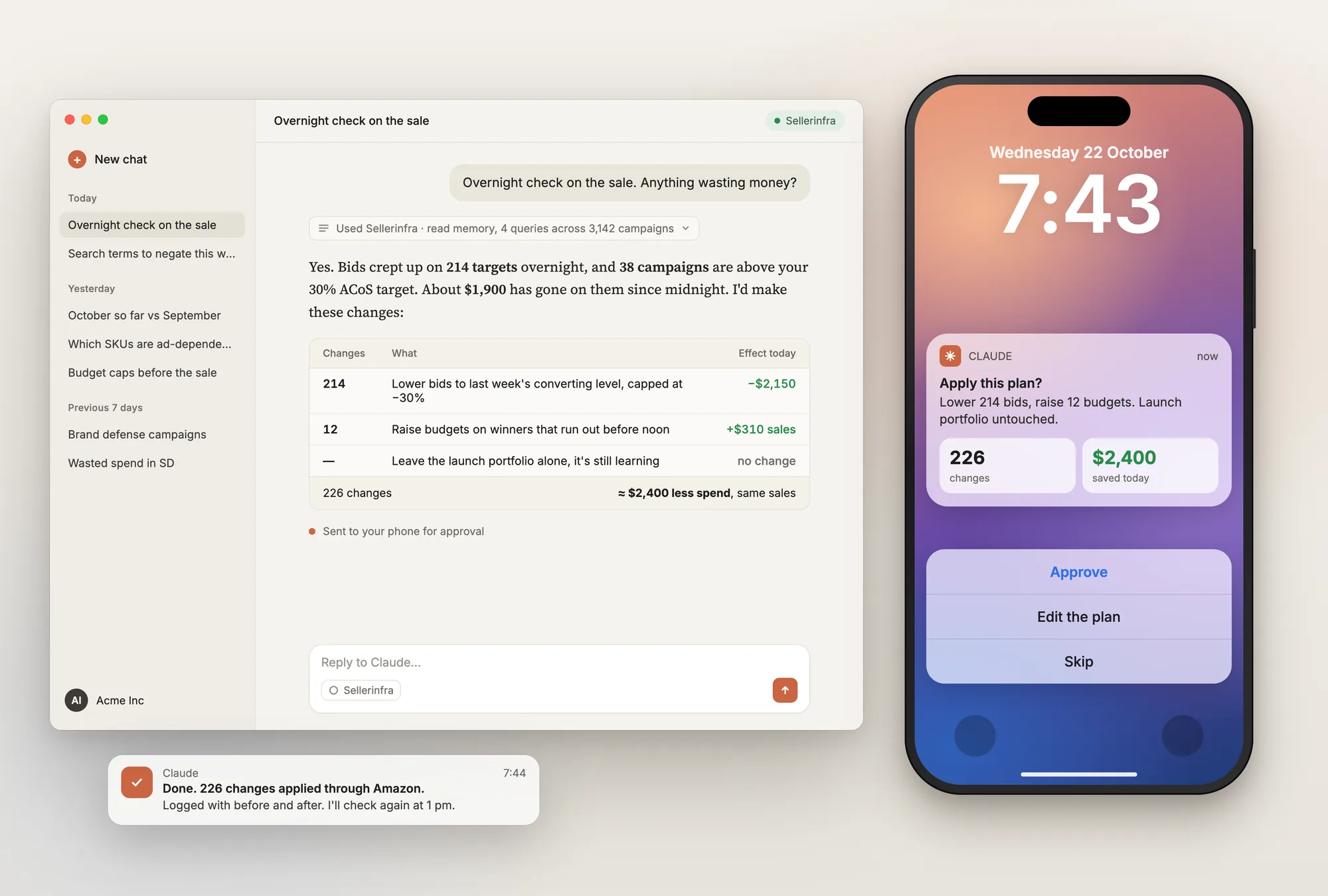
- The morning check. Budgets that ran out early, ACoS spikes against target, zero-impression campaigns, listings suppressed overnight, ASINs under two weeks of cover with ads still running, and every bid, budget and status change made yesterday with who made it. In Slack by 6am, one block per account.
- Search terms. Which terms spent over $50 last month with zero orders, across all brands, with the close variants shown next to each proposed negative.
- True profit per ASIN. After COGS, FBA fees, referral fees, returns and ads, for the last 90 days, with the one product that is quietly losing money flagged.
- Inventory-aware ads. Throttle spend on anything that stocks out before the next shipment lands; push what is overstocked.
- Settlement checks. Whether Amazon overcharged you last month, and the reimbursement you can claim for lost and damaged units.
- Sale days by the hour. Watch budget pacing hourly during Prime Day, raise inside your caps, pull back when bids creep.
- Reports and dashboards. A shareable page of weekly ACoS and TACoS by portfolio, built in under a minute from your own numbers.
Four Ways to Connect Claude to Seller Central and Amazon Ads
All four use the Model Context Protocol (MCP), the standard that lets Claude call tools. They differ in what they can see, whether they remember anything, and where your data ends up.
| Route | What Claude sees | History | Can it act | Where data lives | Cost | Setup |
|---|---|---|---|---|---|---|
| Amazon Selling Partner plugin for Claude | Seller Central: sales, inventory, listings, FBA inbound. US stores only. No ads | Live only | Yes, review and approve every action | Amazon | No fee published | Add the connector in Claude, sign in with Amazon |
| Amazon Ads MCP Server (official) | Ads only: SP, SB, SD, DSP, AMC. No Seller Central | About 95 days via the API, nothing stored | Yes, no built-in confirmation | Amazon, passthrough | No fee published | Needs your own Ads API approval and LWA app; tokens expire hourly on public clients |
| Hosted connectors (Marketplace Ad Pros, DataDoe, Agent Central, SellerMate, Helium 10) | Ads plus Seller Central, varies by vendor | 90 days to 2 years, varies | Most preview or confirm writes | Vendor's servers | $39 to $359 a month | OAuth sign-in, minutes |
| Owned deployment (OwnYourAMZ, or Kuudo if you self-host) | Every Ads and Seller Central report, daily, side by side | Everything from the day you connect, kept for good | Plan with counts, you approve, logged, undoable | Your own account | About $5 a month hosting (OwnYourAMZ); your cloud (Kuudo) | About 14 minutes with the deploy; weeks and an engineer with Kuudo |
How to add any of them to Claude
- Claude.ai or Claude Desktop: open Settings, then Connectors, then "Add custom connector". Paste the server URL (Amazon's, a vendor's, or your own deployment's), click Connect and sign in when prompted.
- Claude Code: run `claude mcp add --transport http <name> <url>` in a terminal, then authenticate once in the browser window it opens.
- Then ask one read-only question before you enable anything that writes: "How much did I spend on ads yesterday, and on which campaigns?" If the number matches the console, the connection is right.
With OwnYourAMZ the order is slightly different because the deployment comes first: paste one setup line into Claude, it creates the system in your own Cloudflare account, you connect Amazon through the approved app, and you paste one link back. About 14 minutes, no API application. See how to use Claude for Amazon PPC for the full build story.
Claude Skills for Amazon Sellers: What They Are and Which Ones Matter
A Claude skill is a folder with a SKILL.md file inside it. The file tells Claude when the skill applies, what to look at, what counts as a problem, and what output to produce. You install skills under Settings, then Capabilities, then Skills in Claude.ai and Claude Desktop, or by dropping the folder into your Claude Code skills directory. From then on, "run the wasted spend hunt on Brand A" does the same thing every time, the way a written procedure does for a new hire.
There are now free skill packs for Amazon sellers on GitHub, some with tens of thousands of installs, plus skills published by tool vendors (Helium 10 released a keyword opportunity skill that reads a Cerebro export). Most of them share one limit: they work on a file you paste, because they have no connection to your account. A skill that audits negatives from one search term report is useful once. A skill that reads 14 months of search terms, your COGS, your stock cover and your change log, and proposes negatives with the close variants shown, is a colleague. The difference is not the skill. It is the data under it.
The 39 skills that ship with the setup
Every one of these runs against your own data, and every one that changes anything goes through a plan you approve. The ones sellers use most, by job:
| Job | Skills |
|---|---|
| Ads, every week | Ads performance review (30 days), wasted spend hunt, bid and budget review, search term harvesting, campaign structure and funnel audit, Sponsored Brands and Display review, TACoS and ad dependency analysis |
| Ads, when something changes | Sale event readiness (Prime Day, Big Deal Days), ads ops (build, copy or change campaigns, bids, budgets, negatives and portfolios through an approved proposal) |
| Sales and profit | Revenue trend analysis, FBA fee and size-tier audit, reimbursement claims finder, B2B sales analysis, brand audit scorecard |
| Inventory | Replenishment and reorder plan, overstock and storage cost decisions, stranded inventory fix |
| Listings | Listing copy and SEO audit, title optimisation, title compliance refresh (75-character limit), returns diagnosis to listing fixes, suppressed main image fix, main image tactics, compliant main image, listing image set, A+ image suite |
| Competitors and market | Competitor threat scan, competitor keyword gap, competitor review mining, category and price map, market research, ASIN deep research, pre-launch go or no-go, launch checklist |
| Account | Account health diagnosis, Buy Box loss investigation, unauthorised seller check, support case writer (cases, appeals, plans of action), new brand deep dive |
Then there is the one that matters most: a skill that writes skills. It knows where the data lives, which Amazon endpoints exist, how approval works and what the guardrails are. You describe a check in plain English, it writes the skill, tests it against the last eight weeks and shows you what it would have flagged before you turn it on. "Every Monday at 9, message me if any product's TACoS rose more than 3 points week over week, skip anything under $20,000 a week." Eleven minutes from that sentence to the first alert, in our experience. The team adds their own now without knowing the internals.
The First Five Checks to Run
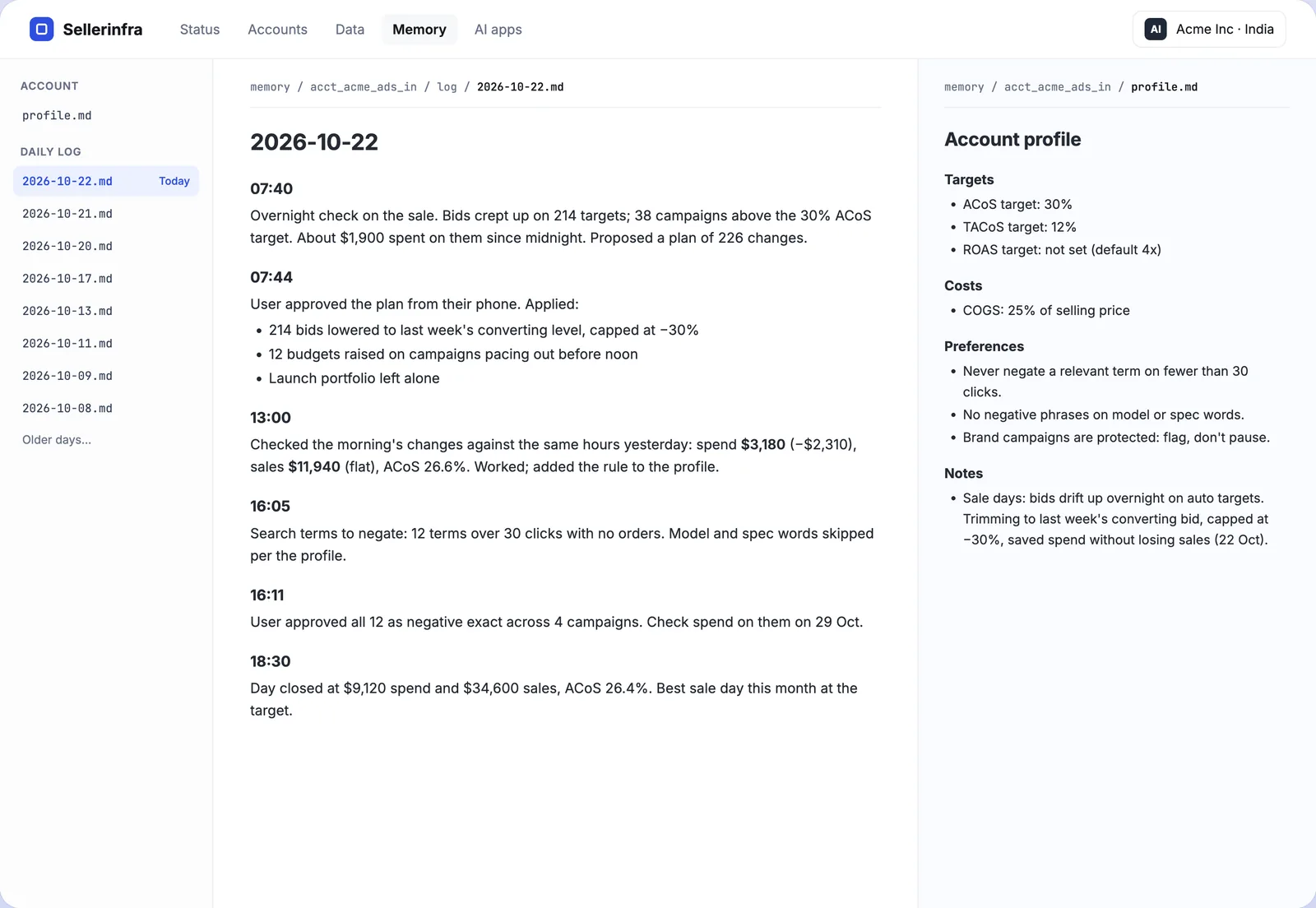
Once Claude can read the account, these five questions find money in almost every account we have connected. Ask them in this order, and read what a good answer looks like before you trust it.
- "What changed yesterday across all accounts, and did any of it work?" A good answer lists every bid, budget and status change with who made it, and what the campaign did in the hours after. If the answer has no "who", the connection is not pulling the change history report.
- "Which search terms spent over $50 in the last 30 days with zero orders?" A good answer shows spend, clicks and the close variants for each term, and proposes negative exact or negative phrase per term rather than a blanket list.
- "Which ASINs are under two weeks of cover and still have ads running?" A good answer uses inbound shipments, not just FBA stock, and names the campaigns to throttle.
- "True profit per ASIN for the last 90 days, after COGS, fees, returns and ads." A good answer needs your COGS, so expect Claude to ask for them once and remember. The product quietly losing money is usually one you advertise hardest.
- "Did Amazon overcharge us in last month's settlement, and what can we claim?" A good answer reconciles fees against the size tier and lists lost and damaged units with the claim window still open.
After those, let it propose. "Add those as negatives and pause anything over 60% ACoS for two weeks straight" should come back as a plan with counts and an Approve button, not as applied changes.
Claude.ai, Desktop, Code or Cowork: Which One for a Seller
| Surface | Best for | Note |
|---|---|---|
| Claude.ai (web and phone) | Asking questions and approving plans from anywhere | Connectors and skills both work here. Most approvals happen on a phone. |
| Claude Desktop | Daily work with connectors and skills open | Same connectors as the web app, with local files when you need them. |
| Claude Code | Building new skills, dashboards and reports; agencies | A terminal. Where the skill that writes skills does its best work, and where a developer would extend the setup. |
| Claude Cowork | Scheduled and file-based work on a desktop | Runs the same skills; useful for weekly reports that need files assembled. |
Claude's plan determines how much you can ask in a day, and a long morning check across many accounts uses a meaningful share of a Pro plan. Agencies tend to run a Max plan or the API. The connection itself does not care which surface or plan you use.
Safety: What to Allow and When
- Connect through Amazon's own OAuth. Your approved app or a vendor's. Never paste your Seller Central password anywhere; a connector that asks for it is not using the API.
- Know where the data lives. Amazon's routes store nothing. Hosted connectors store it on their servers; ask about retention and region. An owned deployment keeps it in your account, which also means it keeps working if the vendor disappears.
- Start read-only. A week of questions tells you what Claude gets wrong about your account before it can act on it.
- Writes go through a plan. Counts first, then approve, then a log with the value before and after. Rules you write (never pause a hero product, never negate a relevant term on fewer than 30 clicks) override whatever it works out.
- Amazon's policy allows it. Amazon published its own MCP server and its own Claude plugin for exactly this use. What it does not allow is sharing credentials or scraping; the API routes above do neither.
Frequently Asked Questions
Can Claude access Amazon Seller Central?
Yes, through a connector. Amazon's own Selling Partner plugin for Claude covers sales, inventory and listings for US stores and has been in beta since 23 September 2026. Hosted connectors and owned deployments such as OwnYourAMZ cover Seller Central in every marketplace, alongside Ads.
How do I connect Claude to Amazon Seller Central?
In Claude.ai or Claude Desktop, open Settings, then Connectors, then Add custom connector, paste the server URL and sign in with Amazon. In Claude Code, run claude mcp add with the URL. With OwnYourAMZ, paste the setup line first; it creates the server in your own account and gives you the URL.
Does Claude work with Amazon Ads as well as Seller Central?
Yes. Amazon's Ads MCP server covers ads only and needs your own API credentials. Most hosted connectors and the owned setup cover Ads and Seller Central in one connection, which is what you need for TACoS, profit per ASIN and inventory-aware bids.
What are Claude skills for Amazon sellers?
Installable playbooks: a folder with a SKILL.md file that tells Claude what to check, what counts as a problem and what to produce. Free packs exist on GitHub and some vendors publish them. They become useful when they run against your own account data rather than a pasted file.
Are there free Claude skills for Amazon sellers?
Yes. Several open source packs on GitHub cover keyword research, listing audits and search term analysis, and Helium 10 published a keyword opportunity skill. Most work on exported files. The 39 skills that ship with OwnYourAMZ run against the synced account data and come with the setup.
Can Claude change my bids, budgets or listings?
With write access, yes. The safe pattern is the one every serious connector uses: Claude writes a plan with counts, nothing runs until you approve it, and every change is logged with the value before and after so it can be undone. Amazon's official Ads server has no built-in confirmation step, so add one on the client side if you use it.
Is connecting Claude to my Amazon account allowed?
Yes, when it goes through Amazon's API with OAuth, which is how Amazon's own plugin and server work. Sharing your Seller Central login or scraping the console is not allowed and is not how any of the routes here work.
Claude or ChatGPT for Amazon sellers?
Both connect to the same servers, and most connectors list both. We run on Claude because skills and memory fit how our rules are written, and the approval flow is built around it. The data layer, the sync and the MCP server work with either.
Get Claude Connected to Your Account in One Call
On a call we deploy the system into your own Cloudflare account, connect every Amazon profile through the approved app, run the backfill while we talk, and run the first five checks with you. The 39 skills come installed, and we write your first rule together. Setup is free for the next 3 accounts. The application is about ten questions and takes two minutes; a person reads it and replies within one business day. Get your setup.