Guides
How to Use Claude for Amazon PPC: The Setup We Run an Agency On for $5 a Month
Three ways to use Claude for Amazon PPC, why pasting exports stops working, and the $5 a month setup that lets it read your account and act on your approval.
 Dhiraj SoniFounder, OwnYourAMZ. Ex-Amazon.
- Published
- Updated
- Reading time
- 15 min read
There are three ways to use Claude for Amazon PPC, and they are not three versions of the same thing. You can paste reports into it and get advice. You can connect it to your account and get answers. Or you can put your data somewhere you own, connect Claude to that, and get an employee that reads everything, proposes changes, and makes them when you say yes. We run an agency on the third one for about $5 a month in hosting. This is how each level works, where it breaks, and what the third one took to build.
Disclosure: we make OwnYourAMZ, which is the third level packaged as a one-click deploy. Everything in the build section works without it. The numbers are ours.
Key Takeaways
- Pasting exports into Claude caps out fast. It cannot see last month, your inventory, or what your team changed on Tuesday, and it cannot act. You get a second opinion, not an employee.
- Connecting Claude to your account over MCP changes the first half. Amazon's own Ads MCP server has been in open beta since 2 February 2026. It reads live data and can change campaigns, but it stores nothing and sees about 95 days.
- Owning the data changes the second half. Every Ads and Seller Central report synced daily into a database you control gives Claude more than a year of history, ads next to sales, inventory and costs, and a change log nobody can argue with.
- The AI part is easy. The Amazon part took six months. Async reports, 60 to 95 days of retention, numbers that restate for a week, shared rate limits, and a wait of weeks for API access. The seven rules we learned are below.
- It costs about $5 a month to run. Our PPC software bill was about $2,500 a month. The setup runs in our own Cloudflare account; the Claude plans we already paid for do the thinking.
The Three Ways to Use Claude for Amazon PPC
Almost everyone starts at level one and most people stop there, because levels two and three need the data plumbing that nobody writes about. Here is what each level can see, whether it can act, and what it costs.
| 1. Paste exports | 2. Connect over MCP | 3. Own the data | |
|---|---|---|---|
| What Claude sees | The file you pasted | Live API data, about 95 days of reports | Everything, from the day you connected, ads next to sales, inventory and costs |
| Memory of past changes | None | None (most connectors) | Every bid, budget and status change, who made it, what happened after |
| Can it act | No, you apply by hand | Yes, with whatever guardrails the connector has | Yes, plan first, you approve, logged before and after |
| Runs on a schedule | No | Rarely | Yes, in your own account |
| Setup | None | Minutes with a hosted connector, weeks if you need your own API approval | About 14 minutes with our deploy, about six months if you build it |
| Cost | Your Claude plan | $0 to $359 a month plus your Claude plan | About $5 a month hosting plus your Claude plan |
| Fits | Checking one search term report | Asking questions about this month | Running accounts every day |
Level 1: Pasting Reports into Claude
Export a search term report or a bulk sheet, paste it in, ask a question. This works, and it is where you should start if you have never done it. Three jobs it does well: it finds search terms that spent with zero orders and writes a negative keyword list; it groups a messy campaign structure into something you can explain; and it reads a bulk sheet faster than you can. Prompts that work at this level are specific about the file and the decision: "Here is 30 days of search terms for one campaign. List every term over $20 spend with zero orders, and for each one tell me whether a negative exact or negative phrase is safer given the close variants in the file."
Where it stops. Claude cannot see last month to tell you whether a term is always bad or just had a bad week. It does not know that the ASIN you are about to push has eleven days of stock left. It has no idea what your team changed on Tuesday, so it cannot tell you whether a change worked. And when it is done, you still open Campaign Manager and make every change by hand. Every seller we know who tried AI for PPC did this for a while and then went back to the tool they were paying for, because the tool at least remembered things.
Level 2: Connecting Claude to Your Account
MCP, the Model Context Protocol, is the standard that lets Claude call tools. An Amazon Ads MCP server turns the Ads API into tools Claude can call in plain language, so instead of pasting a report you ask for it. Amazon launched its own server in open beta on 2 February 2026. It covers Sponsored Products, Brands, Display, DSP and AMC, and it can create, update and delete campaigns. It also needs your own Ads API approval, stores nothing, and returns what the API returns, which for reports is about 95 days. A set of hosted connectors (Marketplace Ad Pros, DataDoe, Agent Central, SellerMate and others) remove the API-approval step and add Seller Central data and varying amounts of history. We compared eight of them in the Amazon Ads MCP shortlist.
This is a real step up. Claude now reads your actual numbers and can change a bid. Two things it still does not do. It does not remember: most connectors pass calls through, so "what did we change last Prime Day and did it work" has no answer. And it does not run on its own: you open Claude, you ask, it answers. The morning check that catches a budget that ran out at 9am is still you, at 9am.
Level 3: Owning the Data, and How We Built Ours
Why we built it
I am not someone who wants to build tools. What pushed me was the questions no tool could answer. What did my team change last week, and did it work? Which ASIN is about to stock out and still has ads running? What is my real profit per ASIN after COGS, fees, returns and ads? Was I overcharged in last month's settlement? Which campaigns bring new customers rather than repeat buyers? Every tool has a slice of that. None has all of it, so none can answer. Claude can, if it can see everything at once. It could not, because the software had my data and I was paying them every month for the privilege. So the whole job became: get Amazon connected to infrastructure I own, connect that to Claude, and let Claude take it from there.
What it looks like when it works
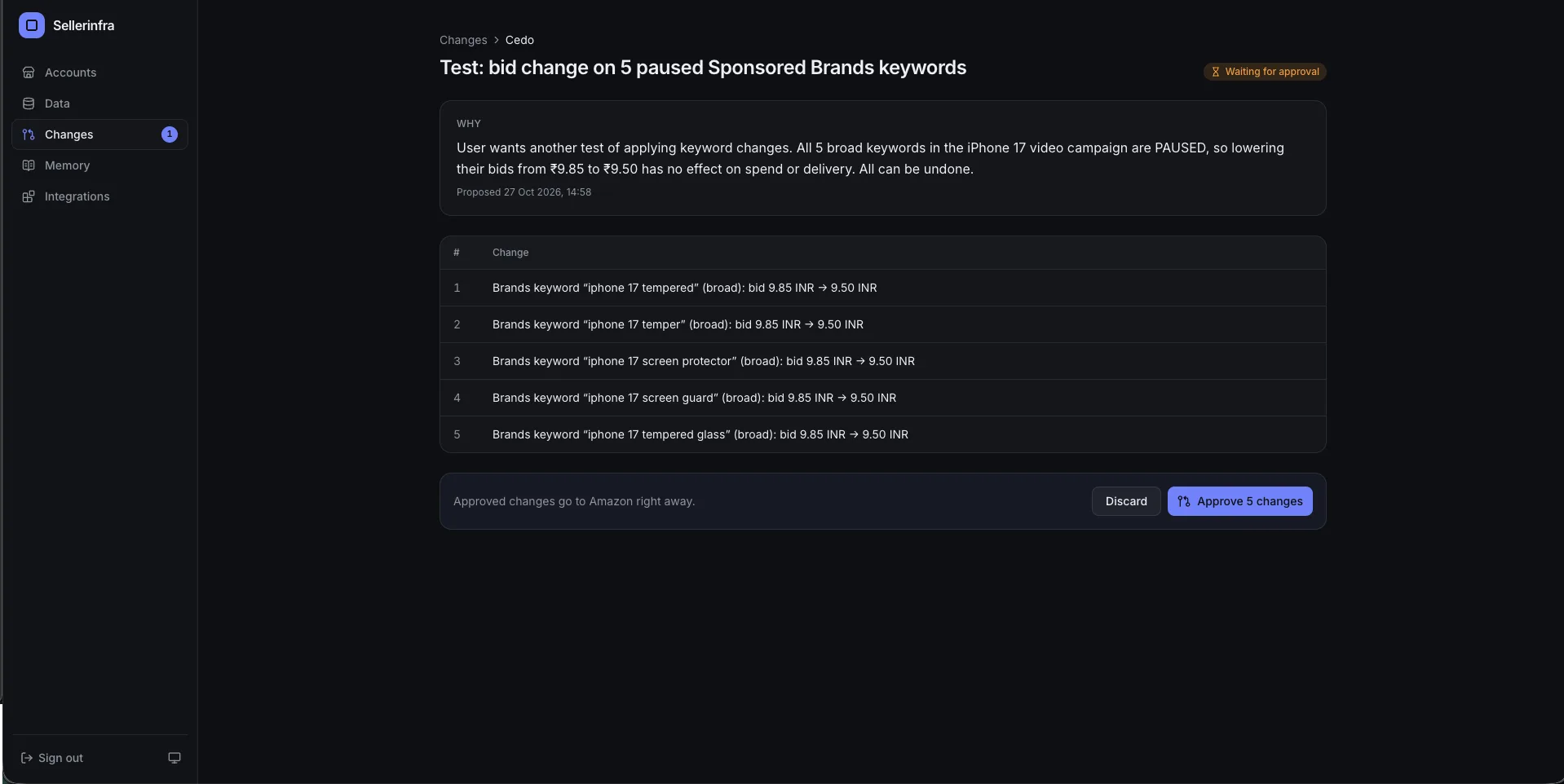
Last sale event one brand had more than 3,000 campaigns live. Overnight, bids crept up and ACoS spiked in pockets. Normally three of us would sit there all day making adjustments. Instead Claude read the hourly data, analysed all 3,000 campaigns, worked out which bids to pull back and which budgets to protect, built the bulk action, and asked me to approve it. I read the plan on my phone, said yes, and it executed against the Ads API. It checked again the next day. Analyse, propose, approve, act. That is the unlock. Not answering questions, although it does that in seconds from more than a year of history. Claude acting, with a plan first, and nothing moving without approval unless you have set a rule to run on its own.
The two pieces
One piece syncs everything from Amazon into a database we own. The other lets Claude talk to that database: an MCP server with a login, whose URL you paste into Claude.ai, Claude Desktop or Claude Code. Ours runs in our own Cloudflare account for about $5 a month. Nothing has to stay awake, and Claude.ai reaches it from my phone. A Mac mini or a cheap VPS would work the same if you do not care about the phone part.
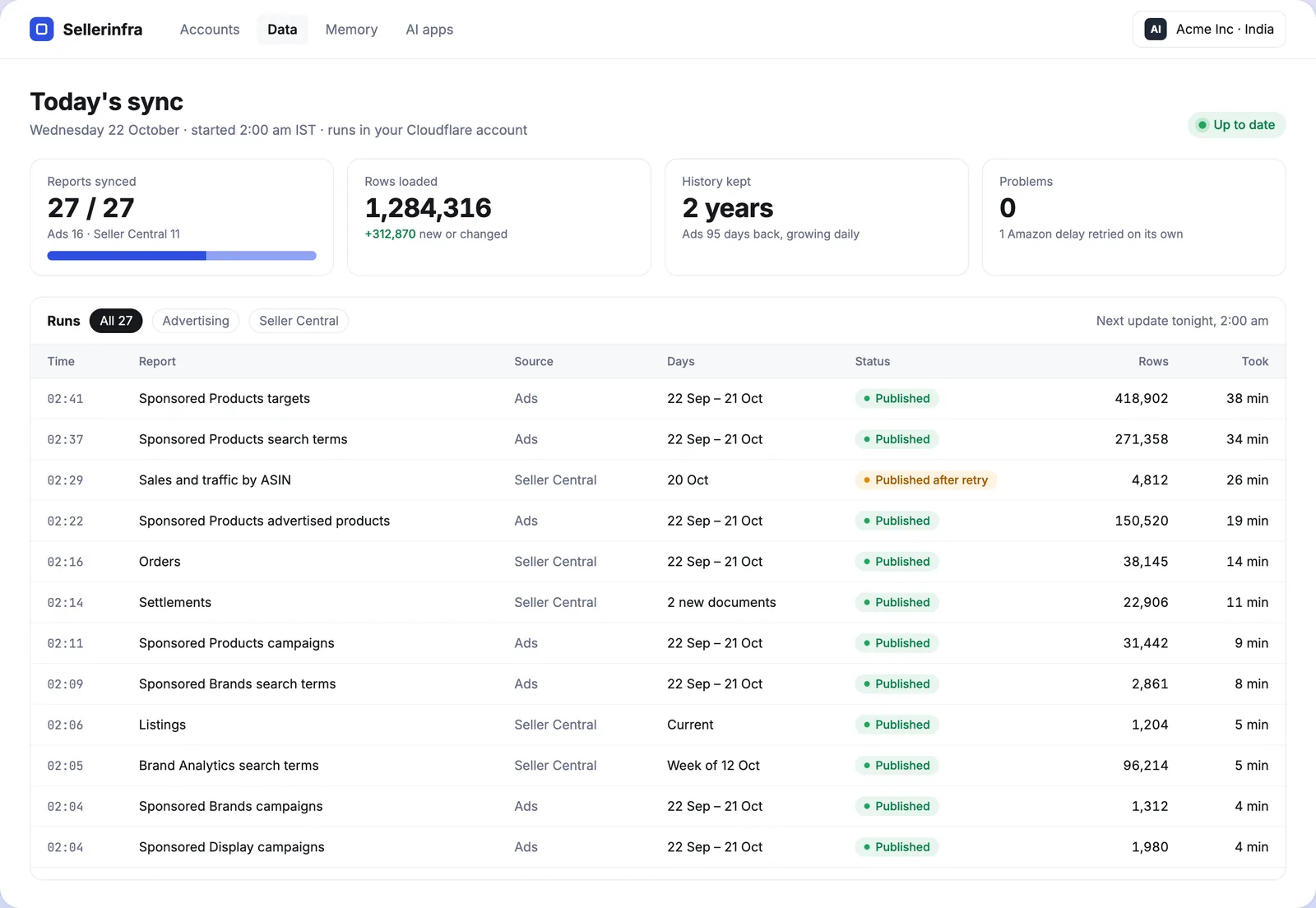
What the sync pulls, every day, per profile
- Ads. Sponsored Products, Brands and Display campaigns, targeting, search terms, placements, advertised and purchased product reports.
- Seller Central. Sales and traffic, orders, settlements, returns, listings, Search Query Performance, Brand Analytics where available, inventory. Vendor sales for 1P.
- Ads change history. Every bid, budget and status change, who made it and when. This one ends every "who changed this" argument, and almost nobody pulls it.
- Marketing Stream. Hourly data. During a sale you cannot wait a day to see what is happening.
- AMC, weekly. Path to purchase, new-to-brand by campaign, cart-abandoner audiences.
- Keepa. Price, BSR, rating and review history for your ASINs and competitors'.
Every report is kept from the day we connected, raw files included. The API serves 60 to 95 days depending on the report; we have well over a year, and we can reprocess anything if the logic changes.
The seven Amazon API rules that cost six months
The $5 part is easy. The Amazon part is where the time went. Each rule below exists because something broke without it.
- Reports are async. Request, poll until ready (5 to 30 minutes is normal), download. Anything that assumes a report comes back when asked will fail quietly.
- Retention is 60 to 95 days depending on report type. Backfill the maximum on first connect, then never miss a day. A missed day is gone.
- A day's numbers keep changing for about a week because of attribution windows. Re-pull a trailing window every day and upsert on entity plus date. Plain inserts give you duplicates and wrong totals, and it took me a while to notice.
- Rate limits are shared per region across everything you run. Back off instead of retrying hard. Reporting has its own queue-based limit that behaves differently from the rest.
- Marketing Stream sends deltas, so negative numbers are normal restatements. Aggregate them. Filtering them out is the most common mistake.
- One database per brand, with daily and hourly rollups, so Claude is not scanning millions of rows to answer "how was yesterday" and never wanders into another brand's data.
- API access as a direct advertiser can take weeks right now. Amazon's own GitHub is full of people waiting. We got ours last year; other brands now authorise through our approved app and skip the wait.
Skills, rules and memory
The intelligence is not in the database. It is in skills: business logic saved as plain text files next to the data. What to look at, what counts as a problem, what to do about it. Because ads, the hourly stream, sales, inventory, COGS, AMC and the change history are all in one place, a skill can know things no single tool knows. One of our bid rules reads "above 4x ROAS, cap the bid at $2, but not if days of cover is under 20". Another: "alert me when a listing loses the Buy Box to a reseller of my own product". You describe the logic in English, Claude writes the skill, tests it against the last eight weeks, and shows you what it would have done before you turn it on. There is a skill whose only job is to write other skills, so the team adds their own now without knowing the internals.
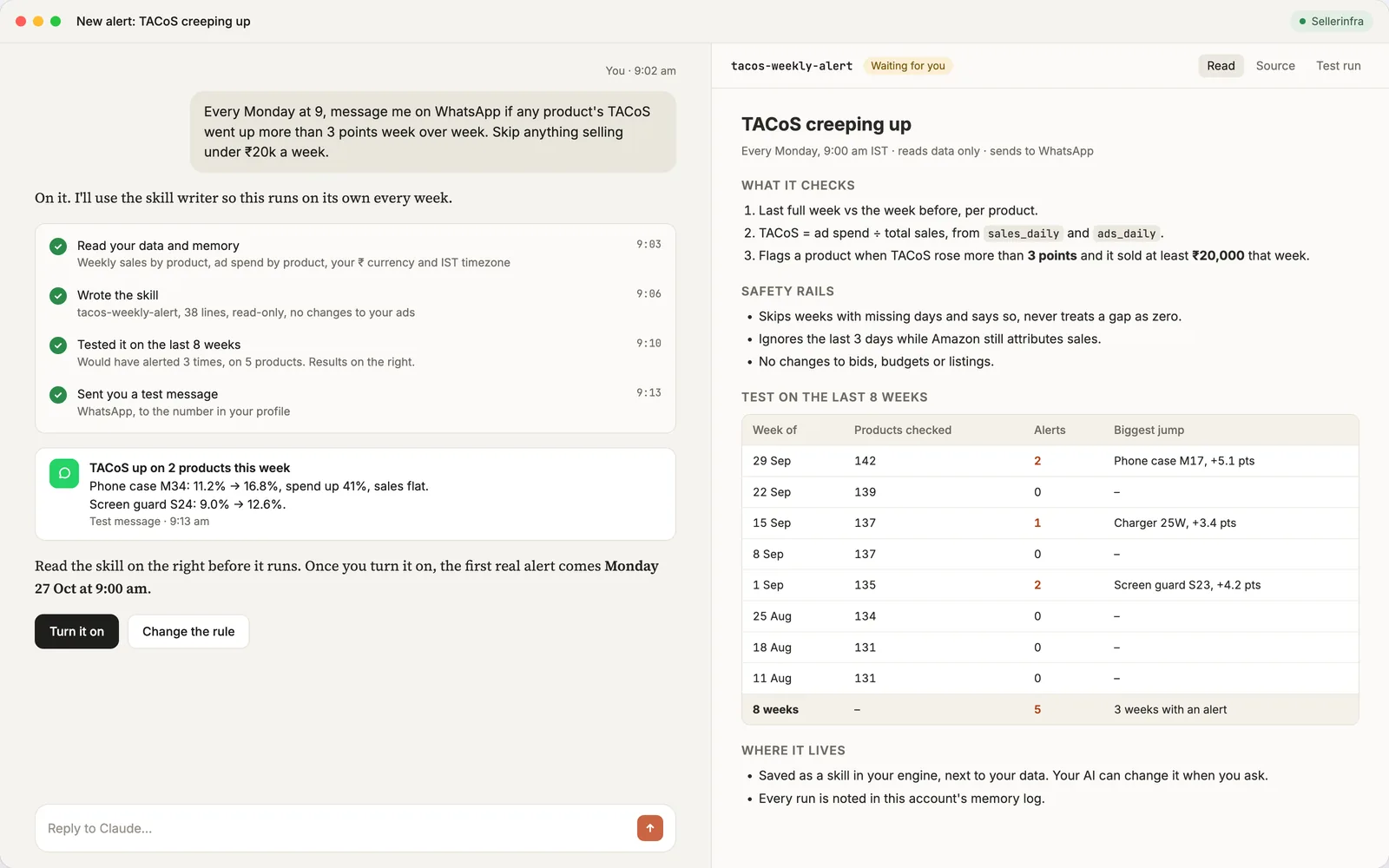
Memory is the third piece. Every question, change and result is written down: your targets, your rules, what worked last sale. Each day it starts sharper, and "what did we change and did it work" is a lookup, not an argument.
What a Day Looks Like
Every account gets checked before I am up. The morning check lists budgets that ran out early, ACoS spikes against target, zero-impression campaigns still holding budget, listings suppressed overnight, ASINs under two weeks of cover with ads still running, and every bid, budget and status change made yesterday, with who made it. It lands in Slack by 6am, one block per account. Nobody quietly moves a bid anymore, including me.
The rest of the day is questions, mostly from my phone. "What changed yesterday across all accounts and did any of it work." "Which ASINs are under two weeks of cover and still have ads running." "Sale is live, anything wasting money since midnight." "True profit per ASIN last month after COGS, fees, returns and ads." "Did Amazon overcharge us in last month's settlement." Each answer takes seconds and uses everything, not one export. When an answer needs a change, the change arrives as a plan with counts, and nothing moves until I say yes.
Guardrails: Letting Claude Change Bids Without Regret
Write access is where people get nervous, and they should. These are the rules we run under, and the ones we would tell anyone to start with.
- Plan first, every time. Claude writes what it wants to do in plain English with counts (lower 214 bids, raise 12 budgets, leave the launch portfolio alone) before anything happens.
- You approve. One tap. The only things that run without a tap are rules you wrote, tested and turned on yourself.
- Everything is logged with the value before and after, so any change can be undone and "what did we change" is never a mystery.
- Your rules override its reasoning. Never pause a hero product. Never raise a bid above $2. Never touch the launch portfolio during a sale. Write them once; they apply to every plan.
- Decide at the search-term level, not the campaign level. Campaign ACoS blends good terms with bad ones. A plan that pauses a campaign because its ACoS is high is usually wrong; a plan that negates the three terms dragging it is usually right.
- Break-even per ASIN comes from margin, not a ROAS ratio. The ACoS you can afford on a 60% margin product and a 25% margin product are different numbers. The setup knows COGS, so the target is per ASIN.
- Show close variants next to every proposed negative. A negative exact on "iphone 17 case" also covers plurals and misspellings. Before approving, you want to see the spend and sales of the close variants, not just the one term.
- Start read-only. Connect, ask questions for a week, and only then turn on writes. You will learn what it gets wrong about your account before it can act on it.
Build It Yourself or Deploy Ours
If you have an engineer, a few months, and you want to understand every piece, build it. Everything above is enough to start, and the seven rules will save you most of the six months. You will need Ads API approval as a direct advertiser, which is the slow part, plus Docker or a cloud account, and a tolerance for reports that arrive when they feel like it. Three brands we know copied the design and each dropped $15,000 to $20,000 a year of tools.
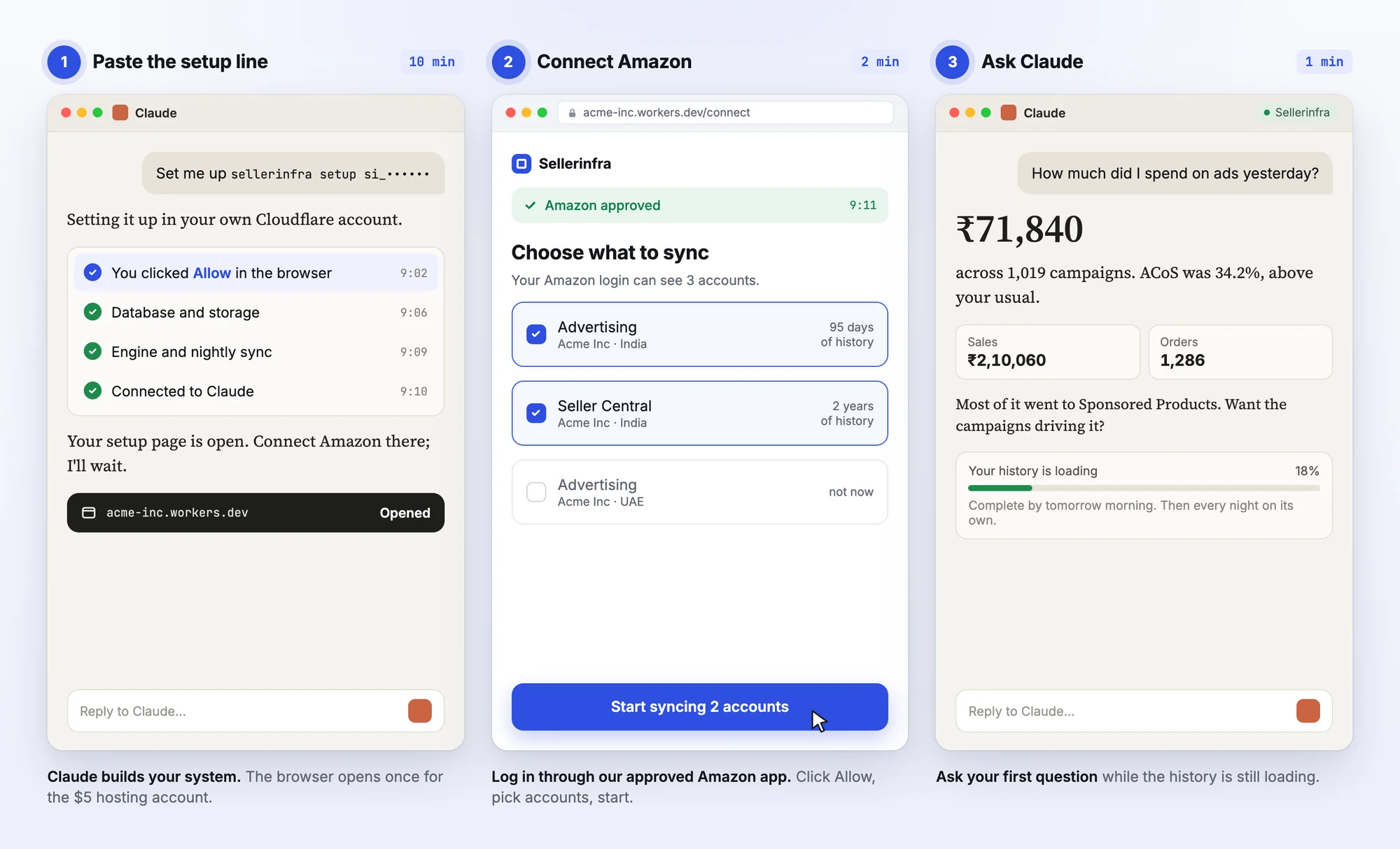
If you would rather have it running by this afternoon, we packaged the whole thing. Paste one line into Claude and it deploys the sync and the MCP server into your own Cloudflare account. Log in through our approved Amazon app and click Allow, so there is no API application and no wait. Paste one link back into Claude and ask your first question while the backfill runs; you have roughly a year of history by the next morning. It is about 14 minutes on the clock. There is no subscription and no percentage of spend, the source is included and written so Claude can extend it, and it runs without us if we disappear. Setup is free for the next 3 accounts, done with you on a call. Get your setup if that is the version you want.
Frequently Asked Questions
Can Claude manage Amazon PPC on its own?
It can propose and, with write access, apply changes, but it should not run unsupervised. The pattern that works is plan first, you approve, every change logged. The only things that run on their own are rules you wrote and tested, such as a bid cap that respects days of cover.
Do I need the Amazon Ads API to use Claude for PPC?
For level one, no: you paste exports. For levels two and three, Claude reaches your account through the Ads API, either with your own approved application, which can take weeks right now, or through a connector's approved app. OwnYourAMZ uses the second route, so there is no wait.
How much does it cost to run Claude on Amazon PPC?
Level one costs only your Claude plan. Hosted connectors run from $0 to $359 a month on top. The owned setup described here runs in your own Cloudflare account for about $5 a month, plus the Claude or ChatGPT plan you already pay for. Our previous PPC software bill was about $2,500 a month.
Does this work with ChatGPT instead of Claude?
Yes. The MCP server in front of the database works with Claude.ai, Claude Desktop, Claude Code and ChatGPT. Most hosted connectors also list both. We use Claude because its skills and memory fit how the rules are written, but the data layer does not care.
How much history does Claude get?
Pasting gives it the file. Amazon's own MCP server and most connectors give it what the API returns, about 95 days for reports. The owned setup backfills everything Amazon still has on day one and keeps every day after, so history only grows. Ours is well over a year.
Is it safe to connect my Amazon account to Claude, and is it allowed?
Connecting through Amazon's own OAuth, with your approved app or a vendor's, is the sanctioned route, and Amazon published its own MCP server for exactly this. The real risks are a vendor holding your data and an assistant changing things without a check. Keep the data in your own account, start read-only, and keep writes behind approval.
What is the difference between this and a PPC tool like Perpetua or Adtomic?
A PPC tool runs its own bidding engine on the ads data it holds, for a monthly fee that usually scales with spend. This setup puts all your data, not just ads, in a place you own and lets the AI you already pay for reason across it, with rules you wrote in English. It replaces the part where a person reads reports and decides, and the part where you pay a percentage of spend for a tool to remember things.
What do I need to start?
Your Amazon login with admin access to Seller Central and the Ads console, a Claude plan or ChatGPT, and a card for the $5 a month Cloudflare hosting billed to you. No server, nothing installed on your computer, nothing to maintain. Claude does the technical parts of setup and you click Allow.
Get the Setup Running on Your Account
On a call we deploy the sync and the MCP server into your own Cloudflare account, connect every Amazon profile through the approved app, run the backfill while we talk, and write your first rules together: your ACoS targets, the products never to pause, the morning check you want in Slack. You leave with history loading and Claude answering from it. Setup is free for the next 3 accounts. The application is about ten questions and takes two minutes, and a person reads it and replies within one business day. Get your setup, and bring the account you most want to see it on.