Guides
Amazon TACoS: The Formula, Why It Moves When ACoS Does Not, and How to Watch It
Amazon TACoS for operators: the formula next to ACoS with worked numbers, break-even per ASIN from margin, what a good TACoS means, and how to track it weekly.
 Dhiraj SoniFounder, OwnYourAMZ. Ex-Amazon.
- Published
- Updated
- Reading time
- 12 min read
Amazon TACoS is total advertising cost of sales: ad spend divided by all sales, organic included. ACoS is ad spend divided by the sales Amazon attributes to ads. The two numbers answer different questions, and most of the confusion about TACoS comes from treating it like a stricter ACoS. This guide gives you the formula with real dollars, shows why TACoS moves when ACoS does not, works out break-even per ASIN from margin, explains what a good TACoS actually means, and ends with the one weekly check we run on every account.
Disclosure: we make OwnYourAMZ, which computes TACoS by ASIN and by portfolio from your own Ads and Seller Central data. Every number below comes from the worked examples on this page, not from your account and not from a benchmark report.
Key Takeaways
- TACoS = ad spend / total sales. In the worked example, $4,000 of ad spend on $40,000 of total sales is a TACoS of 10%. The same $4,000 on $16,000 of ad-attributed sales is an ACoS of 25%.
- TACoS can rise while ACoS stays flat. Organic sales fell from $24,000 to $16,000 in the example and TACoS went from 10% to 12.5% with ACoS unchanged at 25%. That is an organic problem, not a bidding problem.
- Break-even ACoS is margin before ads, per ASIN. Product A at a $30 price clears $11.10 after COGS, FBA, referral and returns, so its break-even ACoS is 37%. Product B at $20 clears $4.50, so 22.5%. One target for both is wrong for both.
- A good TACoS is your own trailing 90 days, by ASIN. Published benchmarks vary by category and stage, so compare each product to itself. Launches run high on purpose; mature products should trend down.
- Watch the 30-day rolling trend, not the day. A day's numbers keep moving for about a week as Amazon attributes sales to earlier clicks. Our weekly rule flags any product whose TACoS rose more than 3 points week over week.
The TACoS Formula, Next to ACoS
Both metrics start with the same numerator, ad spend. They differ in the denominator. ACoS divides by sales that Amazon attributes to an ad click. TACoS divides by every sale the product made, organic and paid together. Written out:
- ACoS = ad spend / ad-attributed sales x 100
- TACoS = ad spend / total sales x 100
Here is one month for one product. Ad spend was $4,000. Amazon attributed $16,000 of sales to those ads. Total sales, from the sales and traffic report, were $40,000. So $24,000 came in without an attributed click.
| Metric | Calculation | Result |
|---|---|---|
| Ad spend | From the advertised product report | $4,000 |
| Ad-attributed sales | From the advertised product report | $16,000 |
| Total sales | From sales and traffic by ASIN | $40,000 |
| Organic sales | $40,000 total minus $16,000 attributed | $24,000 |
| ACoS | $4,000 / $16,000 | 25% |
| TACoS | $4,000 / $40,000 | 10% |
ACoS tells you how efficient the ads are at producing the sales they get credit for. TACoS tells you what share of the whole business the ads are costing. If you only run ads on a product and it has no organic rank, the two numbers are equal. The further apart they sit, the more organic sales the product has. That gap is the thing worth watching.
Why TACoS Moves When ACoS Does Not
Take the same product the next month. Ad spend is still $4,000 and ad-attributed sales are still $16,000, so ACoS is still 25%. But total sales fell to $32,000. Organic dropped from $24,000 to $16,000. TACoS is now $4,000 / $32,000, which is 12.5%. Nothing changed in the ad account, and the number every bidding tool optimises stayed flat. The business got worse anyway.
That is the point of TACoS. It catches the things ACoS cannot see, because they happen outside the ad console:
- Organic share changing. A lost ranking, a new competitor on page one, or a listing change that cut conversion. Ads keep converting at the same rate; organic volume falls underneath them.
- Launches. A new product has almost no organic sales, so nearly every sale is paid and TACoS runs close to ACoS. It is supposed to.
- Stockouts and low stock. A product that goes out of stock loses organic rank first and recovers it last. Ads often keep spending on the days around the stockout.
- Price changes. A price drop lifts total sales and can lower TACoS without any ad change. A price rise does the reverse.
- Halo. Ads on one product bring buyers who purchase a different product in the brand. The spend lands on the advertised ASIN; the sale lands elsewhere. Brand-level TACoS catches it; ASIN-level ACoS never will.
So a rising TACoS with a flat ACoS is not a bidding problem and bids will not fix it. It is a ranking, stock, price or listing problem, and the right response is to look at the sales and traffic report, not the campaign manager. A rising ACoS with a flat TACoS is the opposite: ads got less efficient, but organic picked up the slack. A rising ACoS and a rising TACoS together is the one where you cut bids.
Break-even ACoS from Margin, per ASIN
Before you can say whether 25% is good or bad, you need the break-even for that product. Break-even ACoS is the margin left after every cost except ads, as a share of price. Spend exactly that share on ads and the sale makes nothing. Two products from the same brand:
| Product A | Product B | |
|---|---|---|
| Price | $30.00 | $20.00 |
| COGS | $8.00 | $7.00 |
| FBA fee | $5.50 | $4.50 |
| Referral fee (15%) | $4.50 | $3.00 |
| Returns allowance (3% and 5% of price) | $0.90 | $1.00 |
| Margin before ads | $11.10 | $4.50 |
| Break-even ACoS (margin / price) | 37% | 22.5% |
| Target ACoS at a 15 point net margin | 22% | 7.5% |
A single account-wide target of 30% looks reasonable. On Product A it leaves 7 points of margin. On Product B it loses 7.5 points on every attributed sale. The same number is profitable on one ASIN and loss-making on the other, which is why any rule that reads "pause above 30% ACoS" is wrong for most of the catalogue it runs on. Targets have to be per ASIN, and they have to come from COGS and fees, which live in Seller Central and your cost sheet, not in the ad console.
The same margin gives you break-even TACoS. If every sale, organic or paid, clears $11.10 on a $30 price, then total ad spend can reach 37% of total sales before the product stops making money. In practice you want TACoS well under that, because organic sales are the ones you are not paying for.
What a Good TACoS Means
You will find benchmark percentages published for Amazon TACoS. They disagree with each other, because they come from different categories, different price points and different stages of product life, and none of them knows your margin. We do not quote one here. The reasoning behind them is more useful than the numbers.
- Launches run high on purpose. A new product has no organic rank, so almost every sale is paid and TACoS sits near ACoS. You are buying rank. A high TACoS for the first weeks is the plan working, as long as organic share is rising week over week.
- Mature products should trend down. As organic rank builds, the same ad spend sits on top of a larger total, and TACoS falls. A mature product whose TACoS is flat or rising is losing organic share or being over-advertised.
- Low margin products need a low TACoS. Product B above cannot afford what Product A can. The acceptable number is a function of margin, not of category averages.
- Brand TACoS and ASIN TACoS are different questions. Brand level includes halo and tells you what the ad budget costs the business. ASIN level tells you which products are carrying the spend.
The benchmark that works is your own history. For each ASIN, compare this week's TACoS to its trailing 90 days. For each portfolio, do the same. A product running 3 points above its own 90-day average has changed, whatever the category average is. A product that has run 40% for a year is not "bad" if its margin is 50% and its organic share is still climbing; it is a launch that has not finished. The question is never "is 12% good". It is "is 12% higher than this product usually runs, and if so, what moved: spend, attributed sales or organic sales".
Read the 30-Day Trend, Not the Day
Daily TACoS is noisy for two reasons. Ad spend is lumpy: a budget that runs out at noon, a sale day, a weekend. And Amazon's numbers for any single day keep changing for about a week after it, because sales get attributed to clicks from earlier days as the attribution window plays out. A day that looks like 14% TACoS on Tuesday morning can read 11% by the following Monday, with no change in the ads.
Two habits fix this. Compare 30-day rolling windows, so a bad Tuesday is one thirtieth of the number rather than the whole number. And treat the last 7 days as provisional: do not act on them, and re-pull them every day until they settle. Anything that pulls Amazon's reports once and never re-pulls a trailing window is quietly showing you the wrong number for a week.
How to Compute TACoS by ASIN, Portfolio and Week
The console will not give you TACoS. Campaign Manager knows ad spend and attributed sales, so it can show ACoS. Seller Central knows total sales by ASIN, so it can show revenue. Neither report knows about the other, and the only place they meet is a spreadsheet or a database you build. Here is the join.
- Pull the advertised product report from the Ads console or the Ads API, for each ad type you run. It gives spend and attributed sales by advertised ASIN and day. Sum spend by ASIN and day.
- Pull sales and traffic by ASIN from Seller Central business reports. It gives ordered product sales by child ASIN and day. That is your total sales.
- Join on ASIN and date. TACoS for an ASIN on a day is ad spend / ordered product sales. Divide by zero happens on days with spend and no sales; treat those as 100% or leave them blank, but be consistent.
- Roll up to portfolio by mapping ASINs to portfolios (or parent ASINs) and summing both sides before dividing. Never average the percentages; always sum spend and sum sales, then divide.
- Roll up to week the same way, and compute the trailing 30 days as a rolling sum. Re-pull the last 7 days every day.
- Add margin per ASIN from your cost sheet and the FBA fee report to get break-even ACoS and break-even TACoS next to the actuals.
Doing this once in a spreadsheet takes an afternoon. Doing it every day, for every ASIN, with the trailing 7 days re-pulled, is a data job, which is why most sellers look at it once a quarter and most tools do not show it at all. The setup we run does the join nightly from both reports and keeps every day from the day the account connected, so the 90-day self-benchmark is always there. How we built that is its own article.
TACoS Calculator: The Worked Table
Until the interactive calculator page is live, here is the arithmetic laid out so you can run it on your own numbers. Three inputs: ad spend, total sales, and margin before ads as a share of price.
| Input or output | Example | How to get it |
|---|---|---|
| Ad spend (period) | $4,000 | Advertised product report, summed |
| Total sales (period) | $40,000 | Sales and traffic by ASIN, ordered product sales |
| TACoS | 10% | $4,000 / $40,000 |
| Ad-attributed sales | $16,000 | Advertised product report |
| ACoS | 25% | $4,000 / $16,000 |
| Organic share of sales | 60% | ($40,000 minus $16,000) / $40,000 |
| Margin before ads | 37% | (price minus COGS, FBA, referral, returns) / price, Product A |
| Break-even ACoS | 37% | Equal to margin before ads |
| Break-even TACoS | 37% | Equal to margin before ads, across all sales |
| Target ACoS for a 15 point net margin | 22% | 37% minus 15 points |
How We Watch It: One Weekly Rule
We do not look at TACoS every day. We look at it when it moves. The rule on every account reads, in one sentence to Claude: "Every Monday at 9, message me if any product's TACoS went up more than 3 points week over week, and skip anything selling under a threshold that week." Claude writes the check against the nightly data, tests it on the last eight weeks so we can see what it would have flagged, and then runs it on its own. The 3 points and the sales floor are our rule of thumb, chosen so a product with two sales a week does not trip it. Set your own.
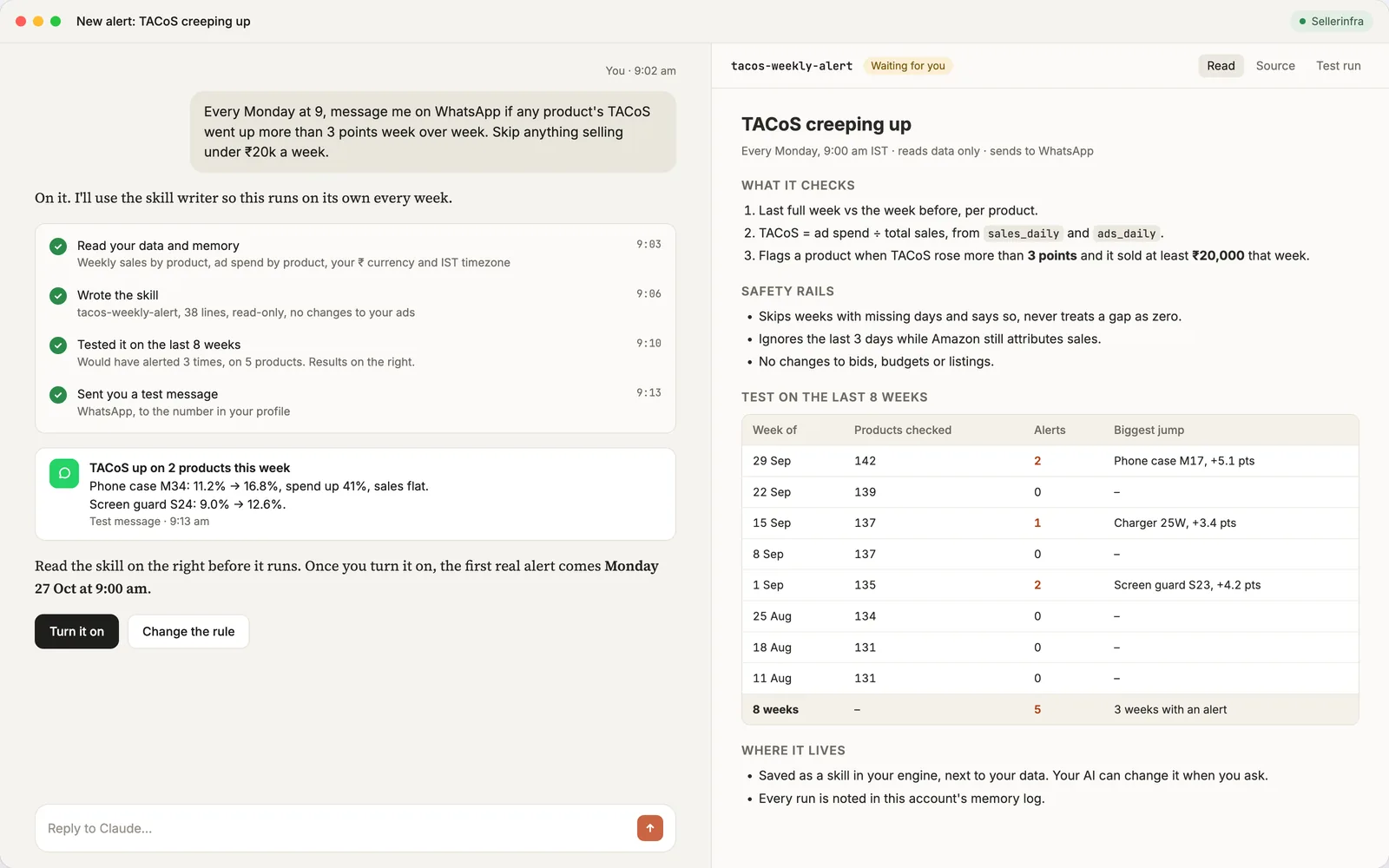
When it fires, the first question is always the same: what moved. Spend up with sales flat means the ads got more expensive. Spend flat with attributed sales down means the ads converted worse. Spend and attributed sales flat with total sales down means organic fell, and that is a listing, stock, price or ranking question. Having the sales and traffic report next to the ads data is what makes that a one-minute answer instead of a day of exports.
Frequently Asked Questions
What is a good TACoS on Amazon?
One that is at or below the product's own trailing 90-day average, and comfortably under its break-even, which is the margin before ads. Published benchmarks vary by category and stage, so a launch running near its ACoS and a mature product running far below it can both be healthy.
How do you calculate TACoS?
Divide total ad spend by total sales for the same period and multiply by 100. Total sales means every sale of the product, organic and paid, from the sales and traffic report. In the example, $4,000 of spend on $40,000 of sales is 10%.
What is the difference between ACoS and TACoS?
Same numerator, different denominator. ACoS divides ad spend by the sales Amazon attributes to ads. TACoS divides it by all sales. The gap between them is the product's organic share, and that gap is what TACoS lets you watch.
What does a rising TACoS mean?
It depends on ACoS. Rising TACoS with flat ACoS means organic sales fell, so look at rank, stock, price and the listing. Rising TACoS with rising ACoS means the ads got less efficient, so look at bids and targeting. Rising ACoS with flat TACoS means organic covered for weaker ads.
Should TACoS go down over time?
For a mature product, yes. As organic rank builds, the same spend sits on a bigger total and TACoS falls. A launch runs high on purpose. A mature product whose TACoS is flat or rising for months is losing organic share or is over-advertised.
How do you lower TACoS?
Find out which side moved first. If organic fell, fix the listing, stock or price and the number recovers without touching bids. If ads got less efficient, cut wasted search terms, lower bids on targets above break-even, and move budget to products with margin to spare. Cutting all ad spend lowers TACoS and usually lowers total sales with it.
Is TACoS better than ACoS?
They answer different questions. ACoS tells you how the ads perform on the sales they get credit for. TACoS tells you what the ads cost the whole business. Run bids on ACoS against a per-ASIN break-even, and run the business on TACoS.
Why does my TACoS for last Tuesday keep changing?
Amazon attributes sales to clicks from earlier days as the attribution window plays out, so a day's attributed sales and sometimes its spend keep updating for about a week. Treat the last 7 days as provisional and compare 30-day rolling windows instead of single days.
TACoS by ASIN, Every Morning, From Your Own Data
Everything on this page is a join between two Amazon reports and a cost sheet, kept every day. OwnYourAMZ runs that join nightly in your own Cloudflare account for about $5 a month, keeps the history from the day you connect, and lets Claude answer "which products are running above their own 90-day TACoS" in seconds. Setup is done with you on a call and is free for the next 3 accounts. Get your setup and the first thing we will write together is the weekly TACoS rule for your account.